
What changes when AI is used in public spaces
Conversation is one of the most familiar ways people ask for help, clarify uncertainty and coordinate action. Voice interaction often works well in private settings. At home, in a car or through a personal device, speaking to an assistant can feel direct and convenient. The user controls the pace, the setting is familiar and mistakes usually remain private.
Conversational AI is often judged by how natural it sounds. We ask whether the assistant can maintain dialogue, respond fluently, understand intent and keep the exchange going.
Research on digital voice assistants and voice user interfaces has also examined usability, user experience and design guidance for conversational systems [1, 2, 3].
Designing AI for momentum means using each modality for what it does best.
Using AI in public and semi-public spaces changes the dynamic: users rarely seek conversation for its own sake in these settings. They seek orientation, clarity and a concrete next step.
A guest standing in a hotel lobby, a customer in a retail store or a traveller in an airport is usually not looking for conversation itself. They are standing, moving, waiting, looking around and sometimes being observed by others. Their attention is divided between the assistant, the physical environment and the task they came to complete.
In this context, the best AI experience may not be the one that feels most like a conversation. It may be the one that helps people stay oriented, confident and able to continue.
This leads to a different design question: instead of asking “How can we make AI speak more naturally?”, we should ask “How can we help people move forward with less effort?”.
In public spaces speaking aloud becomes a socially visible action. The user has to decide not only what to ask, but also whether it feels comfortable to ask it in front of other people. If the system misunderstands, asks for repetition or gives a long answer, the moment can quickly become awkward. Research on the social acceptability of mobile interaction highlights the importance of location and audience [4]. Studies of voice assistants similarly show that setting and privacy concerns influence willingness to use voice in public [5, 6].
This means that before the interaction even begins, the user needs orientation. They need to know what the assistant can do, what kind of answer to expect and how much effort the interaction will require.
Max: Orange’s digital assistant for public service spaces
Digital assistants are beginning to appear in more real-world and public environments. This makes the question of interaction quality increasingly important. In public spaces, the challenge is not only whether AI can answer correctly, but whether it can help people stay oriented, confident and able to move forward.
Orange’s research teams explored these questions with Max, a digital assistant designed for public service spaces, in a year-long experiment in a hotel environment. Max was installed as a physical stand in a shared public space. The system combined voice interaction, screen-based guidance and ways to transfer information to a personal device. This allowed the team to observe not only whether people could complete tasks, but also how they approached the assistant, how comfortable they felt speaking to it and what helped them recover when the interaction became uncertain.
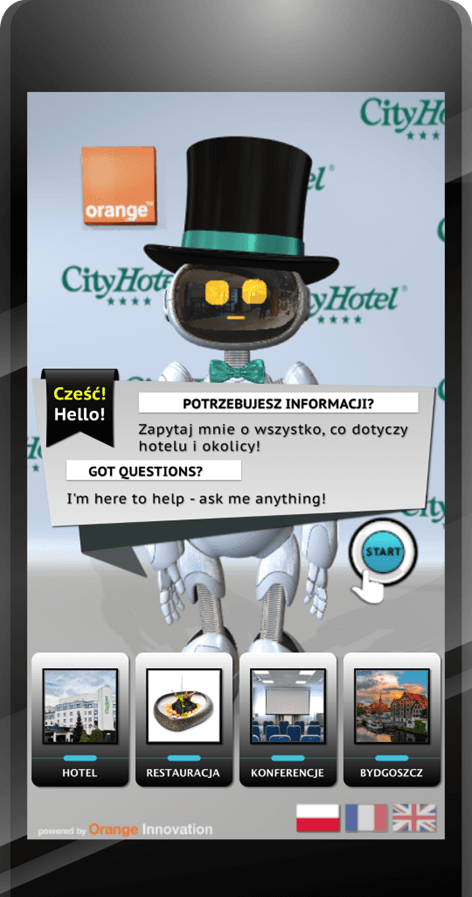
Max, Orange’s digital assistant tested in a hotel environment
When interacting with Max, users often looked at the screen before fully engaging with voice. A quick glance at visible categories, buttons or prompts helped them build a mental map of the system. Once they understood the available options, voice became easier to use.
The screen did not compete with speech. It prepared the ground for it.
This is an important shift. When AI is used in public spaces, visual structure is not simply a backup for failed conversation. It is often what makes voice interaction feel safe, predictable and easy to start.
Voice should carry progress, not memory
Voice can reduce effort when it helps the user move quickly through an interaction. It can be faster than browsing through menus, more natural than typing and more accessible in many situations.
But voice becomes demanding when it is expected to carry too much information.
Spoken information is temporary. Once delivered, it disappears unless the user remembers it, asks for repetition or finds it represented somewhere else. In a public setting, where attention is already fragmented, this can increase memory demands. A long list of options, detailed instructions or several recommendations delivered only through audio may become harder to use than a simple visual summary. Research on chatbot use in workplace tasks also highlights the importance of evaluating cognitive load alongside productivity [7].
This does not mean that voice is unsuitable for public spaces. It means that voice should be designed to carry progress, not memory.
Short responses, clear next steps and visible confirmation preserve the strengths of speech without forcing the user to mentally hold the whole interaction. Voice can say what matters now. The screen can show what needs to remain visible. A mobile handoff, such as a QR code, can carry information beyond the physical interaction point.
This voice-based approach was explored not only for end-user interaction, but also on the service side. Voice CMS, a voice-based content management system, allowed staff to update the assistant’s knowledge base through conversation. In a small exploratory study, users preferred voice for simpler updates, while graphical interaction was generally favoured as tasks became more complex. The findings also highlighted the importance of summaries and the potential value of visual confirmation [8].
This became especially clear in situations where users received directions, recommendations or information that they needed after leaving the assistant. When the information could be transferred to a personal device, the experience changed. The user no longer had to remember everything, repeat the route or worry about losing the details.
One participant described it simply: “I didn’t need to remember everything anymore.”
That sentence captures a key design principle. Sometimes the most useful AI feature is not the most conversational one. It is the one that reduces what the user has to carry mentally.
Multimodality: keeping the interaction comfortable
Multimodality is often described as giving users more options: they can speak, touch, read or continue on another device. This is true, but it is not the whole story.
In real environments, people do not simply choose one channel and stay with it. They continue using a channel as long as it helps them move forward, and shift to another when it starts to limit understanding, control or progress. Voice helps maintain tempo. Visual elements restore orientation. Personal devices extend the interaction beyond the kiosk, counter or screen.
This matches earlier findings that modality selection depends strongly on usage context and that voice and visual interfaces support different forms of action, control and cooperation [9, 10, 11].
Together, these modalities form a support system.
They help users regulate attention, reduce memory demands and recover from uncertainty without abandoning the interaction. This is especially important in public spaces, where even small breakdowns can be more exposed than they would at home.
A misunderstanding in a private setting may be a minor inconvenience. The same misunderstanding in a lobby or retail space can make the user hesitate, stop speaking, switch to touch interaction or leave the system altogether. Voice assistant failures can affect trust and future willingness to rely on the system, even when the breakdown is temporary [12].
For this reason, recovery should not be treated as an exception. It should be part of the interaction model from the beginning.
A visual recap, a short summary, a clear button, a QR handoff or an option to continue later can all help users regain confidence. These elements may seem secondary compared with the conversational engine, but in practice they often determine whether the interaction remains comfortable enough to continue.
Designing for momentum
As conversational AI becomes more capable, it is tempting to treat conversation as the main goal. But public and semi-public service environments require a more precise design lens.
In these settings, conversation is usually not the destination. It is a means of helping people complete a task.
A hotel guest may want to find the spa, check restaurant options or get directions. A customer in a store may want to compare services or understand an offer. A traveller may need orientation quickly, without committing to a long exchange. In each case, the value of AI depends less on how long it can sustain dialogue and more on how well it helps the user take the next step.
Conclusion
Designing AI for momentum means using each modality for what it does best. The screen helps users understand where they are in the interaction and what they can do next. Voice accelerates the experience when a short answer or clear instruction is enough. It works best when it carries progress, not memory. Screens, visual feedback and summaries help maintain orientation, while mobile handoffs, such as QR codes, preserve continuity after the user steps away from the interaction point.
Together, they help users regain confidence and continue.
It also means accepting that the best public AI may sometimes speak less.
The goal is not to make people admire the conversation. In public and semi-public spaces, users rarely seek conversation for its own sake. They seek orientation, clarity and a concrete next step.
The goal is to help them approach the system without hesitation, understand what they can do, recover when uncertainty appears and leave with the information they need.
For designers and product teams, the implication is simple: public AI should not be evaluated only by how natural the conversation feels. It should also be evaluated by whether users understand the system, feel in control and can move forward without carrying unnecessary mental load.
Conversational depth will still matter in many customer relations channels, where dialogue itself can be part of the service experience. But for assistants placed in shared public spaces, the priority is different. The future of public AI may depend less on making assistants more talkative and more on making them easier to approach, easier to understand and easier to leave with confidence.
These conclusions now matter beyond the research setting. Orange’s digital assistant Max is moving from experimentation and pilot projects towards commercial deployment, with its first clients in Poland. As digital assistants become part of real service environments, momentum, recoverability and reduced cognitive effort become conditions for adoption.
For Max, as for many public-space assistants, the mission is not simply to continue the conversation, but to help people continue their task.
Read more
Luger, E., & Sellen, A. (2016). “Like Having a Really Bad PA”: The gulf between user expectation and experience of conversational agents. In Proceedings of the 2016 CHI Conference on Human Factors in Computing Systems (pp. 5286–5297). ACM. https://doi.org/10.1145/2858036.2858288
Author
Emilia Lesiak
UX researcher